How to build an AI agent on WhatsApp with n8n: a practical guide to conversational automation for SMBs
If you run an SMB and receive dozens of WhatsApp messages every day — quote requests, product questions, bookings, after-sales support — you already know the real bottleneck of your business: it is not marketing, it is not the product, it is the time you spend manually answering repetitive conversations that could be handled by an AI agent. In this guide we will see how to build a conversational AI agent on WhatsApp using n8n as the orchestration layer and a model like Claude Sonnet or GPT-4 as the brain, starting from early experiments with the open source Open-WA library and moving to a production-ready architecture based on Meta's official WhatsApp Business Cloud API. The goal is not theoretical: by the end of the guide you will have a clear picture of what you need, how to wire it together and what the real limits are before going live.
Before writing the first n8n node it is worth understanding why this stack has become the de facto standard for conversational automation in small companies. WhatsApp is the preferred contact channel for 78% of Italian customers during the information-request phase, but almost no SMB manages to guarantee timely replies outside working hours. n8n is an open source visual automation platform (self-hostable or cloud) that lets you connect APIs, databases, LLMs and webhooks without writing a backend from scratch: it is the perfect bridge between WhatsApp and AI. An LLM like Claude or GPT-4 provides the conversational brain — language understanding, context memory, the ability to answer naturally and in line with your brand's tone of voice. The sum of these three elements is an AI agent that answers 24/7, qualifies leads, books appointments on your calendar and hands the conversation to a human only when it really matters.
Many online tutorials still start from Open-WA, an open source library that lets you control WhatsApp Web via Puppeteer by simulating a browser. Open-WA has historically been the fastest and cheapest way to start experimenting with WhatsApp bots: you scanned a QR code with your phone and immediately had access to sending and receiving messages via a local HTTP API, perfect to plug into n8n. The problem is that this architecture openly violates WhatsApp's Terms of Service: Meta treats any non-official client as unauthorized use and in recent years has activated increasingly aggressive detection systems that lead to the ban of the number, often without warning. For a personal project or a 24-hour internal prototype Open-WA is still didactically useful to grasp the concepts; for any professional use — especially if the WhatsApp number is your business one — it is a risky choice that will eventually present the bill. The transition from Open-WA to the official WhatsApp Business Cloud API is today the most important step to take.
The WhatsApp Business Cloud API is Meta's official infrastructure designed for companies that want to automate messaging in a compliant and scalable way. It is free up to 1000 user-initiated conversations per month (the most common ones for an SMB), it requires no dedicated servers as it is hosted directly by Meta, and it supports text messages, images, PDFs, approved templates, quick reply buttons and interactive lists. To activate it you need four things: a verified Meta Business Manager account, a dedicated phone number that does not already have an active WhatsApp account (a new SIM or a VoIP number work perfectly), a WhatsApp Business Account created inside Business Manager, and a Meta for Developers app with the WhatsApp product enabled. From the developer panel you will get a Phone Number ID, a WhatsApp Business Account ID and a temporary 24-hour token that you will later replace with a permanent system token generated in Business Manager. Write down these three values: they are the entry key to the whole n8n flow.
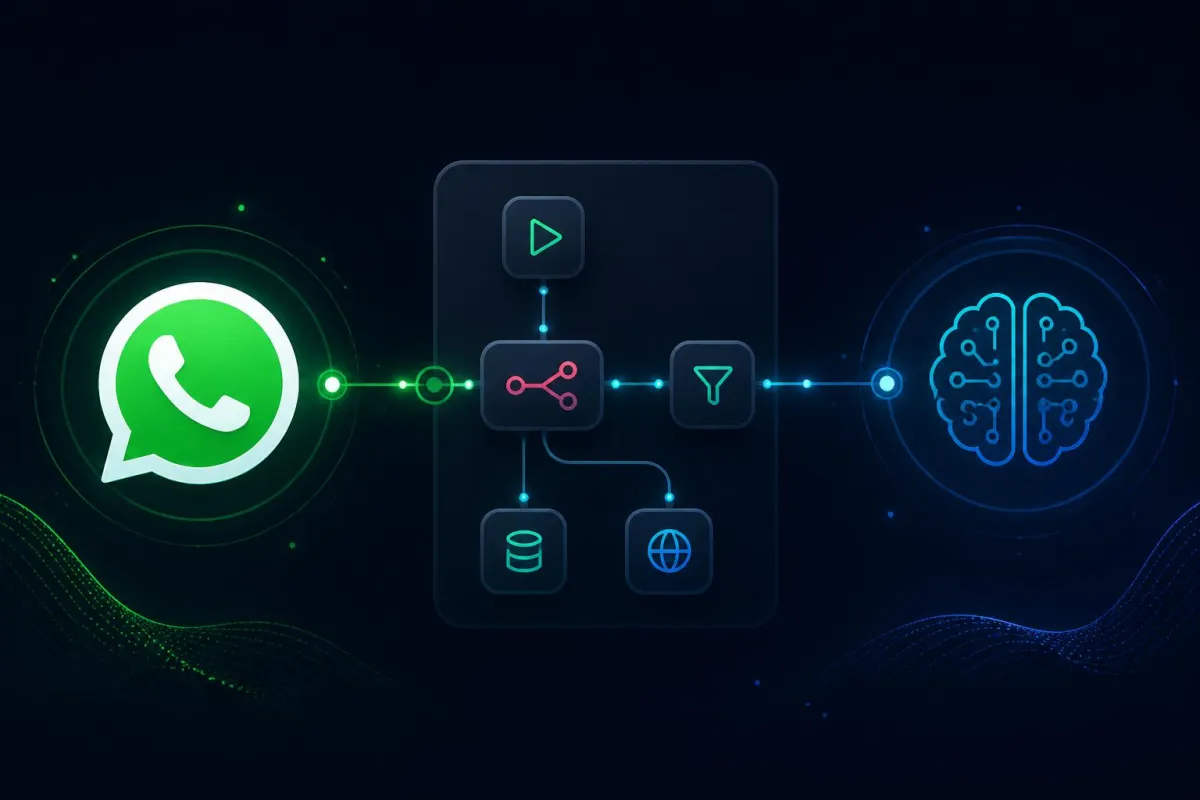
The agent architecture on n8n is simpler than it looks and is made of six logical blocks. First: a Webhook Trigger that exposes a public HTTPS endpoint where Meta pushes every message received by your WhatsApp number in real time. You configure the webhook URL in the Meta for Developers panel and pass the challenge-token verification (n8n handles the GET part automatically if you respond with the correct parameter). Second: a Set or Function node to extract from Meta's JSON payload the fields you care about — sender number, message text, timestamp and message_id — normalizing them into clean variables. Third: a conversation memory node, typically a Supabase or Postgres table, where you read the previous message history for that number to give the LLM context. Fourth: the actual LLM node — n8n has native integrations with OpenAI, Anthropic and Google — where you build a system prompt that defines the agent's role ("you are the virtual assistant of [company name], answer in Italian, be professional but friendly, if the user asks for a quote collect name, need and budget"), pass the message history as context and receive the reply. Fifth: an HTTP Request node that calls the endpoint POST https://graph.facebook.com/v18.0/{phone-number-id}/messages with your token in the Authorization header and the message body in the format required by Meta. Sixth: a node that saves both the user message and the agent reply into the memory table, so that the next conversation starts from an up-to-date context.
The real quality leap of an AI agent on WhatsApp is not the fluency of the replies but the ability to execute concrete actions on business systems. With n8n this step is trivial because every node can be a tool available to the LLM. Some realistic examples: if the user asks to book an appointment, the agent extracts date and time, checks availability on Google Calendar or Cal.com via API, creates the event and sends confirmation with a Meet link; if they ask for a quote, the agent collects the minimum required data, automatically creates a lead in your CRM (HubSpot, Pipedrive, Notion) and sends you an internal notification via email or Slack; if they ask about the status of an order, the agent queries the company database or the Shopify/WooCommerce API and returns updated information; if the request is too complex or emotionally sensitive, the agent recognizes the signal (frustration, urgency, legal topic) and hands the conversation to a human operator, notifying them on Slack or by email with the full chat context. This ability to orchestrate real actions is what turns a generic chatbot into a real operational agent, and it is exactly the kind of work that delivers measurable return for an SMB.
There are five recurring mistakes we see in almost every WhatsApp + AI project and it is better to avoid them upfront. First: using Open-WA in production hoping Meta will not notice — Meta does notice, and the ban of the business number can cost more than a year of official provider fees. Second: forgetting about pre-approved templates for outbound messages. WhatsApp allows the agent to reply freely in the 24 hours following a user message, but to start a conversation or reply outside that window you need a template approved by Meta: plan it in advance if your use case includes follow-up messages. Third: not handling conversation memory, asking the LLM to reply to a message with no knowledge of previous ones. The result is a forgetful agent that asks for the same data three times: always save history to a database and pass the last 10-20 messages as context. Fourth: generic system prompts. A vague prompt produces vague replies; invest time in writing a detailed prompt that describes role, tone of voice, what the agent can and cannot do, when to escalate to a human, concrete examples of ideal replies. Fifth: no human handoff. No AI agent is 100% reliable; the "talk to a human" button — or automatic detection of sensitive intents — is a mandatory feature, not optional.
A common perspective mistake is treating the WhatsApp agent as a one-off project: build it, deploy it, forget it. In reality a conversational agent is a living system that has to be monitored, measured and continuously improved. The minimum metrics to track from day one are: percentage of conversations resolved without human intervention, average response time, satisfaction rate (askable in chat with a simple "was this helpful? 👍/👎"), number of qualified leads generated, number of appointments booked, cost per conversation (LLM tokens + any Meta costs beyond the 1000 free conversations). Every two weeks open the log of conversations marked as "unresolved" or with negative feedback, understand the pattern and update the system prompt or add a new tool. It is in this continuous improvement loop that the agent moves from "nice toy" to "business asset that generates measurable revenue".
How much does it cost and how long does it take to set up?
For a standard SMB use case — first-level customer support, lead qualification, appointment booking — the realistic investment is 2-5 days of work for the first working version and 40-100 euros per month of variable costs across n8n hosting (or n8n Cloud plan), Supabase database (free plan often enough at the beginning) and LLM consumption (Claude Sonnet or GPT-4 cost around 0.003-0.015 euros per message exchanged, depending on context length). The first 1000 WhatsApp Business API conversations per month are free; beyond that threshold Meta costs range from 0.003 to 0.08 euros per conversation depending on country and conversation type. For an SMB receiving 30-50 WhatsApp requests per day, a well-configured agent autonomously resolves 60-80% of repetitive conversations and frees up dozens of hours of human work per month: the ROI is measurable in weeks, not months.
If you want to start from something concrete without reinventing the wheel, the most efficient path is: (1) activate the official WhatsApp Business Cloud API, (2) install n8n in the cloud or self-hosted on a small VPS, (3) configure the base pipeline described above with webhook, Supabase memory, call to Claude or GPT-4 and reply via Graph API, (4) integrate the two or three most important tools for your business (calendar, CRM, orders database), (5) run 1-2 weeks of testing with a small group of pilot users before activating it on the main number. If you need technical support to design or ship a WhatsApp + n8n agent tailored to your industry, book a discovery call: we assess the use case, expected volumes and the most suitable architecture together. Conversational AI is today one of the most affordable and high-impact productivity levers available to an SMB: those who implement it now build a competitive advantage that is hard to recover from behind.
Frequently asked questions
Can I automate WhatsApp without the Business API?
Technically yes with unofficial libraries, but it breaks Meta's terms and the real risk is losing your business number. Professional use requires the official Cloud API.
What are the most common mistakes?
No conversation memory, no human handover, prompts without real business data, no logging, and switching it on for every message type from day one.
What does message handling cost?
Beyond the project, Meta bills per conversation (fractions of a euro) and the model bills per token: at SMB volumes that is usually €20–100 per month.
Davide Stigliani
Full-stack developer and AI agent specialist — Tolve (PZ), Basilicata, Italy
I build AI agents, n8n automations and full-stack web applications for SMBs, connecting them to the ERP, CRM and channels the company already uses. I work across Italy and abroad, on site in Potenza and its province.